A single USB-C / Thunderbolt cable can turn any laptop into a full desktop workstation—but only if you pick the right docking station. Today's docks fall broadly into two camps: brand-specific docks tailored to a particular laptop family, and universal docks built to work across all major brands and operating systems. This article compares the two across compatibility, port configuration, long-term value, and deployment flexibility, to help you make a sounder choice for your team.
What Makes a Dock Truly Universal
A truly universal docking station connects laptops of different brands and operating systems through standardized interfaces—today most commonly USB-C and Thunderbolt. Unlike the proprietary, brand-dependent connectors of the past, USB-C and Thunderbolt (which share the same connector shape) follow a common industry standard, carrying high-speed data, video output, and power over a single cable.
The arrival of Thunderbolt 5 pushes that "universal" idea further. It delivers up to 80Gbps of data bandwidth and can intelligently boost to 120Gbps for video-intensive scenarios, making it possible for a single cable to natively drive multiple high-resolution displays—without relying on an extra graphics-conversion chip, which preserves image quality and latency at the source.
Key traits of a truly universal dock:
• Works across Windows, macOS, ChromeOS, and Linux;
• Connects via USB-C, Thunderbolt 3/4/5, or USB4;
• Supports multi-display output without being locked to a laptop brand.
Why a Brand-Specific Dock Isn't Always the Best Choice
A brand-specific dock pairs with a single laptop family through a proprietary connector or firmware optimized for a particular ecosystem. A dock designed for one model can achieve tight hardware integration, matching that device's power requirements and port layout precisely, and it can simplify IT deployment for organizations standardized on a single brand.
Its biggest weakness, however, is flexibility. Switch brands—or even upgrade within the same family—and the old dock may no longer be compatible. For organizations managing large fleets across brands and generations, that means repeat purchases and added inventory burden.
The table below compares the two across the most critical dimensions:
| Dimension |
Universal Thunderbolt / USB-C Dock |
Brand-Specific Dock |
| Cross-brand compatibility |
Fits most USB-C / Thunderbolt laptops |
Limited to one brand or family |
| Typical port count |
10+, with flagship 12-in-1 models |
4 to 10 |
| Multi-display support |
Dual or triple display common |
Usually single or dual |
| Reuse across generations |
High—no new dock when you switch machines |
Low—tightly bound to current hardware |
| Future-proofing |
High (TB5 is backward-compatible with TB4/USB4/USB-C) |
Low |
| Total cost of ownership |
One dock, many machines—less repeat purchasing and upkeep |
Idle units pile up as models iterate |
Universal docks tend to win on port richness and cross-platform reuse, while brand-specific docks focus on deep integration within a closed ecosystem.
Built for Every Role: Why the Right Dock Matters
A universal docking station is about more than "a few extra ports"—it resolves the specific bottlenecks in demanding users' workflows:
• Financial analysts and traders: No more squinting at a small screen. On a Thunderbolt 5 host running Windows, you can drive up to three independent displays at once—live data, news, and spreadsheets each on its own screen—so you never miss a key market move while switching windows.
• Content creators and video editors: With 10Gbps USB-A ports and a built-in NVMe M.2 SSD slot, 4K/8K footage can be pulled and transferred in seconds; combined with a multi-display layout, timeline, preview, and asset library are all in view.
• Remote and hybrid workers: If you use a Dell at the office and a MacBook at home, what you need is a workstation that just works the moment you plug in. A single standard Thunderbolt 5 / USB-C universal docking station serves both Windows and Mac, sparing you a separate docking station for each device.
Universal Docking Station for Dual- and Triple-Display Setups
Multi-display work is one of the top reasons people buy a dock, and a universal dock is usually the most convenient way to connect a single laptop to two or three screens.
With Thunderbolt 5's native bandwidth, a high-end universal dock can combine HDMI and DisplayPort outputs to natively drive three 4K@144Hz displays or multiple 8K displays on a Windows platform—no extra software required.
It's worth noting that on macOS, the number of displays you can extend depends on the Mac chip itself: base-tier Apple Silicon typically supports a single external display, while Pro / Max chips can support two. A native Thunderbolt dock follows the host's hardware limit, so confirm the display configuration against your specific model before purchase—rather than expecting software to "unlock" more screens.
Triple-display setups are especially suited to:
• Financial traders monitoring multiple data sources at once;
• Video editors juggling timeline, preview, and asset library;
• Developers spreading out code, documentation, and a terminal;
• Remote workers reviewing documents during a video call.
How to Choose the Best Docking Station for Your Workflow
Not everyone needs the same dock. The best one depends on your day-to-day work. Before buying, weigh these factors:
• Port count and variety. List everything you connect regularly: displays, keyboard and mouse, external drives, Ethernet, headphones, camera media, and so on. A docking station with 10+ ports usually covers most professional workflows without extra adapters.
• Fast charging (PD). Many Thunderbolt / USB-C docking station can power the laptop over the same cable while carrying data and video. For ultrabooks, aim for at least 60W; for high-performance or creative laptops, 100W to 140W.
• OS compatibility. Native Thunderbolt 5 / USB-C docking station are largely plug-and-play on both Windows and macOS, with no display driver to install; still, confirm the number of displays and resolution your target model supports.
• Future-proofing. A good universal docking station should carry over to your next laptop. Choosing a model that supports both USB-C and Thunderbolt with a rich port set means you won't have to replace the dock when you replace the computer.
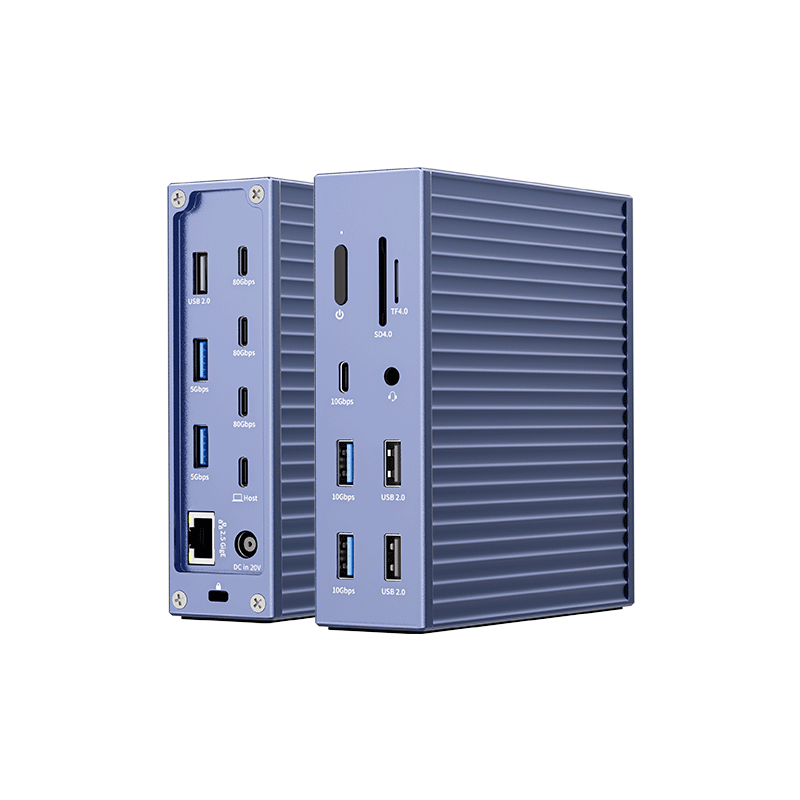
PURPLELEC DS019B: A Thunderbolt 5 Universal Docking Station Across Mac and Windows
PURPLELEC's design philosophy is straightforward: whatever brand the laptop is, one docking station should serve every device on the desk.
Broad Cross-System Compatibility
The DS019B uses Thunderbolt 5 and is backward-compatible with Thunderbolt 4, USB4, and USB-C, connecting laptops from all major brands across Windows and macOS. On a Thunderbolt 5 Windows host, it can drive triple 8K@60Hz / 4K@144Hz, dual 8K@120Hz, or single 8K@144Hz; a Thunderbolt 4 host supports single 8K@60Hz or dual 4K@120Hz. On Mac, the display count follows the chip's capability (e.g., single display on base M-series, dual 6K@60Hz on Pro/Max).
A 12-in-1 Flagship Docking Station
The DS019B consolidates a complete set of desktop connections into one device: 3× Thunderbolt 5, 1× DisplayPort, 2× HDMI, 4× USB-A 3.0 Gen2 (10Gbps), 1× USB-C Gen2, 1× 2.5G Ethernet, and 1× NVMe M.2 SSD slot, with up to 140W pass-through charging.
How it changes your workday:
• Multi-PC collaboration with Thunderbolt Share: Two computers can share the same display, keyboard, mouse, and files over a single Thunderbolt cable—no extra KVM switch or duplicate peripherals—switching between a work machine and a personal one in one step.
• 140W high-power delivery: Keeps power-hungry laptops fully charged even under heavy creative workloads.
• Built-in high-speed storage: The NVMe M.2 slot accepts a fast SSD, adding portable high-speed read/write space for large assets and datasets.
• One cable for every peripheral: From 2.5G Ethernet for low-latency video calls to a rich set of USB and video ports, a single cable handles all connections with no extra adapters.
Finding the Right Docking Station for Your Devices
Choosing between a universal and a brand-specific docking station comes down to one question: do you want a solution that serves only your current laptop, or one that keeps paying off as your team's devices evolve? For most enterprise users, universal docking stations lead on port variety, multi-display support, cross-generation reuse, and future-ready compatibility — and make it easier to standardize workstations sustainably across a mixed fleet.
FAQ
Q1: Universal Thunderbolt 5 docking station vs. brand-specific — how should an enterprise choose?
A1: In most cases, the universal docking station is the safer long-term bet. A solid Thunderbolt 5 universal docking station works across Thunderbolt 5/4, USB4, and USB-C devices, giving it a higher reuse rate across a mixed-brand fleet. A brand-specific docking station integrates more tightly within one ecosystem, but it can become obsolete the moment you switch machines, so its flexibility and reusability are weaker over time.
Q2: Does a universal docking station need software installed?
A2: Native Thunderbolt 5 / USB-C docking stations (like the DS019B) are largely plug-and-play on both Windows and macOS, requiring no extra display software to drive monitors — unlike DisplayLink-based solutions, this makes deployment simpler.
Q3: How many displays can one universal docking station support?
A3: It depends on the docking station's video output capability and the host's performance. With the DS019B, for example, a Thunderbolt 5 Windows host can support triple 8K/4K144 displays; on macOS the count is limited by the chip (often single on base models, dual 6K on Pro/Max). Confirm against your specific model before buying.
Q4: If our team uses only one laptop brand, is a universal docking station still worth it?
A4: Yes. Even in a single-brand environment, you still benefit from richer ports, stronger multi-PC collaboration (such as Thunderbolt Share), and future-ready compatibility. If you later add a second device, switch brands, or share between workstations, you can keep using the docking station without buying a new one.
PURPLELEC provides full OEM/ODM customization for Thunderbolt 5 / USB-C docking stations such as the DS019B, covering private label, hardware and appearance, firmware features, certifications, accessories, and packaging, with MOQ and lead time planned flexibly per project, plus warranty and technical support. For datasheets, samples, or customization proposals, contact the PURPLELEC sales team.









